

Instagram Appeal Form Removed? What You Can Still Do in 2026

Updated: Aug 25
Losing access to Instagram can feel far more serious than the phrase “social media account” suggests. An account may hold years of photographs, private conversations, friendships, creative work, customer relationships, and personal memories.
When Meta then tells you to appeal but offers no button, no working form, and little explanation, the experience can feel both frightening and deeply unfair.

If you have been searching for the old Instagram appeal form, the most important thing to know is this: current official Instagram guidance does not provide a general standalone form for disabled accounts.
Instead, Meta says you may be able to ask for a review by opening Instagram, entering your login details, and following the instructions shown for your specific account.
That does not mean there is always nothing left to try. It does mean that many older articles, videos, and forum posts now point towards routes that are unavailable, restricted, or no longer documented as Instagram’s general appeal process.
This guide explains what you can still do in 2026, what each official route can realistically achieve, and what may remain possible if Meta says your first appeal was your only appeal.
Important: Closer Lives is independent and is not affiliated with Instagram, Facebook or Meta. We cannot access, restore or appeal your account. Nobody commenting, emailing or messaging on our behalf can do this either.
Information and links checked on 10 August 2026. Meta changes its support systems frequently, so the options shown to you may differ by account, product, device, and region.
Key Takeaways
● Use the official route: Instagram no longer documents a general standalone appeal form. Sign in through the app and follow the account-specific instructions, or check Account Status and Meta’s Account Recovery Hub for available options.
● Document the decision: Screenshot the complete notice, record any deadlines and reference numbers, and note whether the account is suspended, disabled, compromised, under review, or subject to a final decision.
● Keep your request accurate: Submit one concise, factual explanation through an eligible official channel. Use the hacked-account route only for genuine unauthorized access, and never pay anyone who promises guaranteed recovery.
Additional Resources
Has Instagram Really Removed Its Appeal Forms?
⪢ What happened to the old standalone links?
For years, Instagram recovery advice revolved around a collection of web addresses containing 'forms.'
Some were intended for disabled accounts, some for identity confirmation, and others for particular intellectual property or privacy issues. They were repeatedly shared as though every disabled user could submit them.
That is no longer how Instagram describes its general process. The current Instagram guidance for disabled accounts says that if you believe your account was disabled by mistake, you may be able to request a review by opening the app, entering your username and password, and following the on-screen instructions.
The word “may” matters. Meta does not promise that every account will receive an appeal button, a form, or another review. The route now appears to depend much more heavily on the exact decision and what Meta presents to that particular account.
It would be too absolute to say that Meta removed every appeal form on one confirmed date in 2025. Meta has not published a single announcement saying that.
What we can say is that its current disabled-account guidance no longer offers a general public form, while many older links are unavailable, redirect elsewhere, or only work for narrowly defined issues.
⪢ Why some people still see a review option
An appeal may still appear:
● During the Instagram login process
● Inside the notice explaining a decision
● In Account Status, if you can still access the account
● In the Support Inbox or Reports and Violations area
● Through a support route available to an eligible verified or business account
This helps explain why two people who appear to have the same problem can see different screens. Their accounts may have been restricted under different policies, be at different stages of review, or have different support eligibility.
⪢ No form does not necessarily mean there is a hidden form.
Changing the browser, using incognito mode, or repeatedly editing an old form address will not necessarily reveal an option that Meta has not made available to the account.
A broken link can occasionally be a browser or login problem, but there is no universal secret form that every disabled user can unlock with a technical trick.
That is frustrating, but it is important. It prevents you from wasting days submitting information through obsolete links or giving sensitive details to unofficial sites that imitate Instagram support.
For the wider recovery process, keep our step-by-step guide to recovering a disabled Instagram account open alongside this article.
If you want the personal story behind our advice, I (Leon) have also shared how I recovered my disabled Instagram account. My recovery happened under an earlier version of Meta’s system, so unfortunately not every screen or route from that experience remains available today.
First, Identify What Meta Has Actually Done
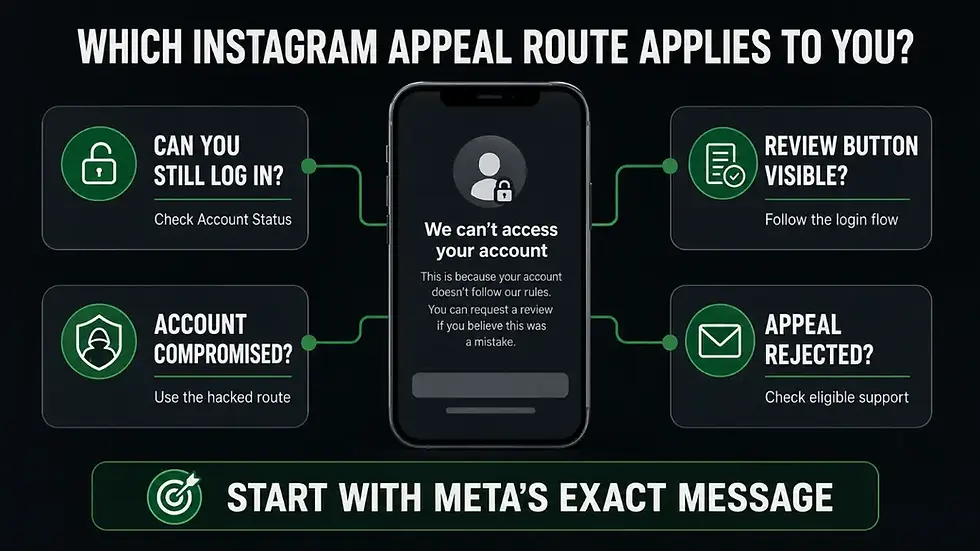
People understandably use words such as "banned," "blocked," "suspended," and “disabled” interchangeably. Meta does not always use them consistently either. Even so, the exact wording on your screen is the best evidence you have.
⪢ Before trying another route, write down or screenshot:
● The complete message, including any policy named
● Whether Meta says the decision is temporary, under review, or final
● Any deadline or deletion date
● Whether a review button appears
● Whether you already submitted a review
● Any case, reference, or support number
● Whether Instagram, Facebook, Threads, Pages, or business assets are also affected
⪢ Use the message to choose your next step:
Suspended and awaiting review:
Complete the official login flow steps and allow the stated review period to pass.
Disabled with a review option:
Submit one clear, accurate request through that option.
Review completed / submitted:
Save the confirmation and check the place Meta tells you to monitor.
Review rejected:
Read the final wording carefully before deciding whether another eligible support or regional route remains.
No appeal option:
Check the official recovery and support areas described below, without inventing a different type of report.
Credentials or account details changed without permission:
Use the official hacked-account route.
A linked Facebook account is suspended:
Read and record its separate notice as well as Instagram’s.
ℹ️ If the notice says the restriction lasts for 24 hours, our guide explains what to do if Instagram disables your account for 24 hours.
⚠️ If the notice says the account is permanently disabled or scheduled for deletion, read what to do if Instagram says the decision is permanent.
What to Do If No Appeal Button or Form Appears
Try the official login flow once, carefully
Open the current Instagram app and attempt to sign in with the username, email address, or phone number connected to the account. Read every screen before continuing. If Meta offers an identity check or review option, complete it only inside the Instagram app or on an official Instagram, Facebook, or Meta domain.
Take screenshots before submitting. If a screen prevents screenshots, use another device to photograph it. Record the date, time, and wording.
Avoid attempting the same action rapidly from several devices, locations, or networks. Repeated login attempts can create an additional security problem and make it harder to separate the original enforcement decision from a new login warning.
Check account status and support messages if you still have access
If you can enter Instagram but some features or content are restricted, Account Status can show removed content, feature restrictions, and whether Meta has made a review option available.
Instagram also says that some review requests can be monitored through Account Status or the relevant violation in the Support Inbox.
Account status is not a way around a complete lockout. It is useful only when you can still reach the affected account or another relevant area of Meta’s interface.
Use Meta’s Account Recovery Hub
Meta now has an official Account Recovery Hub for Facebook, Instagram, and Threads. It brings together recovery guidance and may direct you towards account-specific steps.
Meta also began rolling out an AI support assistant across Facebook and Instagram in 2026.
According to Meta’s support update, the assistant can help explain some decisions, show appeal options, and track what happens next. Meta says access support for people who cannot log in began with selected cases in the United States and Canada, with expansion planned.
This is a legitimate new route, but availability varies. The assistant is not a universal human appeals team, and seeing it does not guarantee that it can reopen a final decision.
Check the official Help Centres without expecting a replacement form
The Instagram Help Center and Facebook Help Center remain useful for confirming the official process attached to a particular message. In 2026, the Help Centres may also show the Meta AI support assistant where it is available.
Use them to verify instructions, not to begin an endless search for a form that Meta no longer documents as the general route.
Use the hacked-account route only if the account was genuinely compromised
The official Instagram hacked-account recovery page is appropriate when there are real signs of unauthorized access, such as:
● An email address, phone number, or password changed without your permission
● Login alerts from a device or location you do not recognize
● Posts, advertisements, or direct messages you did not create
● A security email showing changes you did not make
● Your username or profile details being altered by someone else
⚠️ Do not report an account as hacked simply because the normal appeal option is missing. A false security report can create conflicting information and does not convert a policy decision into a security case.
How to Prepare a Clear Review Request

If an official route allows you to send a message, clarity matters more than length.
⪢ Gather your record first
Keep the following together:
● Instagram username and profile URL
● Email address and phone number previously attached to the account
● Date and approximate time access was lost
● Exact wording of the suspension or disablement notice
● Screenshots of the notice and review confirmation
● Appeal, case, or support reference numbers
● Name of the policy Meta says it was violated if supplied
● Details of affected connected accounts
● Relevant page, business portfolio, or advertising account IDs
Keep a simple timeline. This makes it easier to remain consistent if you later speak to a different support agent.
⪢ Keep the request factual, concise, and consistent
A useful request usually contains five parts:
1. Identify the affected account and the decision you are challenging.
2. State the date and the exact notice you received.
3. Explain briefly why you believe the decision should be reviewed.
4. Correct any specific factual error or describe evidence relevant to the stated policy.
5. Ask for a manual review where the official channel permits that request.
If Meta has not identified the content or activity involved, ask for the specific policy and decision being applied. Do not claim certainty about what happened if Meta has provided no explanation.
⪢ You could adapt the following wording:
I am requesting a review of the decision to disable Instagram account @username on [date]. The notice states [exact wording/policy]. I believe the decision may be mistaken because [brief factual reason]. Please review the specific activity or content involved and, where this support channel permits, refer the decision for manual review. I can provide identity or ownership evidence through an official Meta process if required.
⪢ What not to include
Avoid:
● Threats, insults, or abusive language
● Several contradictory explanations
● A very long personal history that hides the central facts
● Claims that the decision must have been made by AI when you cannot verify that
● False statements that the account was hacked
● Copyright, privacy, or impersonation reports unrelated to the decision
● Passwords, two-factor codes, backup codes, or full payment details
Your account can be emotionally important, and your distress is valid. A review request still needs to give the person or system receiving it a clear issue to investigate.
What If Meta Says That Was Your Only Appeal?
This is one of the hardest messages to receive. It can leave you feeling that a significant decision was made with no meaningful explanation and no genuine opportunity to answer it.
⪢ Read the final wording literally
These phrases do not necessarily mean exactly the same thing:
● “We cannot review this decision through this form."
● “Your appeal was unsuccessful."
● “You cannot request another review."
● “This decision is final."
● “Your account will be permanently disabled."
● “Your information will be deleted after [date]."
ℹ️ Record the exact phrase and any deadline. Do not rely on someone else’s screenshot or assume their timeline applies to you.
⪢ What may still remain possible
Depending on the account and your location, you may still be able to:
● Ask the Account Recovery Hub or available support assistant to explain the decision or show eligible options
● Contact Meta Verified support for the verified account
● Use eligible Meta business support for a connected business asset or compromised administrator account
● Use the hacked-account route if there is genuine evidence of compromise
● Challenge an eligible decision through an EU Digital Services Act process
● Request access to personal data through the appropriate privacy route
● Secure unaffected accounts, pages, payment methods, and business assets
These are not interchangeable appeal forms. A support agent may be unable to reopen the decision. A data request may help you access information but does not compel Meta to restore the account.
⪢ What may no longer be possible
If Meta has completed the offered review and states that no further review is available, you may be unable to:
● Resubmit the original in-app appeal
● Force an old standalone form to accept the case
● Require Meta Verified support to overturn an enforcement decision
● Appeal the disabled account directly to the Oversight Board
● Recover content after Meta has permanently deleted the account data
I do not want to create false hope. Some people do recover accounts after an initial rejection, often because a separate eligible route identifies a mistake or security issue.
Others reach the end of Meta’s available process despite making a careful and legitimate case.
If this is where you are, our Instagram Account Recovery Hub brings the current Closer Lives resources into one place.
Can Meta Verified Support Help?
Meta Verified support officially includes chat and email assistance from support agents for the verified account. This can be useful when the normal interface is unclear or when you need a case documented.
It does not include a promise that an agent can:
● Restore a disabled account
● Reopen a final appeal
● Override an enforcement team
● Recover a different account from the one covered by the subscription
● Guarantee access to a specialist or manual review
Community reports are mixed. Some people say an agent helped identify a route or escalate a genuine error. Others say they received generic responses or were told that the enforcement decision could not be changed.
Treat Meta Verified as paid access to support, not as a paid recovery service.
It may be reasonable to consider if you already have an eligible verified account connected to the issue and can afford the subscription.
I would not advise paying solely on the premise that verification guarantees recovery. It does not.
Business Support, Pages, and Advertising Assets
Business support may be available to some advertisers, creators, business portfolio administrators, and verified businesses. The options vary by account and may appear through Meta Business Suite, Business Support Home, or another account-specific support area.
Business support is most relevant when the problem directly affects:
● Access to a Facebook page or business portfolio
● An advertising account or payment method
● Ownership or administrator permissions
● A connected account that was genuinely compromised
● Business assets left without an accessible administrator
It is not a guaranteed route for overturning an unrelated personal Instagram decision. Do not create an advert or spend money simply because an article claims that doing so will unlock a recovery agent.
⚠️ If you retain access to any business area, protect it now. Record asset IDs, review administrators and partners, remove unknown users, check payment activity, and add another trusted administrator where appropriate. Do not share your own login with that person.
What If Facebook and Instagram Were Both Affected?
Treat each notice as a separate piece of evidence. Check the login flow, Accounts Centre, and support messages for each platform. Do not assume that appealing one account automatically appeals the other.
Facebook’s current suspended or disabled account guidance says that a suspension can be appealed within 180 days and that an unsuccessful appeal or failure to appeal within that period can lead to permanent disablement. Instagram’s current disabled-account page does not publish that same universal 180-day period.
Follow the deadline shown in the notice you actually received. Do not apply Facebook’s deadline to Instagram or assume that an older 28-day or 30-day claim applies to every account.
If one platform remains accessible, use it to review connected accounts and protect unaffected assets. Do not disconnect accounts impulsively if doing so could remove the only remaining route to a page or business portfolio.
Can You Still Download Your Instagram Data?

If you can access Accounts Centre, Instagram places its normal export tools under Your information and permissions. The current Instagram information export guidance explains how to request a copy.
If you cannot log in, the normal export route may not be available. You may still have data-access rights depending on where you live, but a privacy request and an enforcement appeal are different things.
A data request may help you obtain personal information Meta still holds. It does not require Meta to reinstate an account, restore deleted material, or provide another policy appeal. Use the privacy route for a genuine data request, not as a disguised recovery complaint.
Where access remains, export important photographs, messages, and account information before a stated deletion deadline. Meta may not preserve everything indefinitely once an account is permanently deleted.
Regional Rights and External Dispute Options
⪢ European Union
The EU Digital Services Act gives users ways to contest certain platform moderation decisions, including restrictions placed on accounts. The European Commission’s guidance explains that users may use a platform’s internal complaint system and may be able to take an eligible dispute to a certified out-of-court dispute settlement body.
These bodies do not issue the same kind of binding judgment as a court, but platforms must engage with them in good faith. Eligibility, language, fees, and subject matter vary between bodies. This is an EU route, not a worldwide Instagram appeal form.
⪢ United Kingdom
The United Kingdom is not part of the EU Digital Services Act system. UK data-protection rights may still be relevant to personal-data access and, in some cases, decisions made solely through automated processing that have a legal or similarly significant effect.
The Information Commissioner’s Office guidance explains those rights but also notes that the law has specific thresholds. A fast Instagram rejection does not prove that no human was involved, and it is not certain that every account disablement meets the required level of significant effect.
Do not treat a reference to automated-decision law as a guaranteed account-recovery technique. If your circumstances are serious or commercially significant, consider obtaining independent legal advice.
⪢ Other countries
Consumer and data-protection rights differ widely. Check your national data protection or consumer regulator for accurate local guidance. Avoid template complaints that cite laws from a country where you do not live or rights that do not apply to your case.
Why a Rapid Decision Does Not Prove It Was Entirely Automated
Meta openly uses automated systems in content enforcement and account support. It has also publicly discussed reducing enforcement mistakes. That makes it reasonable for users to question whether automation played a role, especially when a rejection arrives very quickly.
However, speed alone cannot prove how one decision was made. A system may automate detection, prioritization, review, or communication in different combinations. A rapid notice does not establish that no person was involved, just as a slow response does not guarantee a detailed human review.
The most accurate wording is that Meta uses both technology and human processes, while affected users frequently report decisions that feel automated, unexplained, or too fast to reflect the evidence they submitted.
The Meta Oversight Board has also raised wider concerns about account-level transparency and due process. Even so, the Oversight Board’s eligibility rules say that an individual normally needs an active account and must be able to log in to appeal a content decision.
It is therefore not a practical appeal route for most people whose entire account is disabled.
Outdated Instagram Recovery Advice to Avoid
Avoid advice telling you to:
❌ Submit several obsolete appeal forms every day
❌ Change URLs or browser settings until a hidden form appears
❌ Pay a person claiming to have an internal Meta contact
❌ Report the account as hacked when it was not compromised
❌ File false copyright, impersonation, or privacy complaints
❌ Contact random email addresses presented as Instagram support
❌ Share identity documents through an unofficial upload page
❌ Give anyone your password, two-factor code, or recovery code
❌ Install remote-access software for a “recovery agent."
❌ Use a VPN to bypass Meta enforcement
❌ Assume Meta Verified guarantees reinstatement
❌ Create contradictory cases through every support category you can find
⚠️ No legitimate recovery service needs your password or login code. A real Meta employee will not ask you to pay them privately, buy cryptocurrency, purchase a gift card, or move the conversation to an encrypted messaging app.
Realistic Expectations:
What Is Policy, What Is Reported, and What We Think
⪢ Documented by Meta
● Accounts can be disabled for policy violations.
● Some people may be offered an in-app review.
● Account status can show certain violations and review options when access remains.
● Meta Verified includes chat and email support for eligible verified accounts.
● Meta uses technology and human systems across enforcement and support.
● Some decisions become final, and some data may later be deleted.
⪢ Reported by affected users
● No appeal button appearing
● Very rapid decisions or rejections
● Generic responses that do not identify the content involved
● Connected accounts becoming inaccessible
● Meta Verified and business support producing inconsistent results
● Review timelines differing widely between apparently similar cases
⚠️ These reports are credible evidence of people’s experiences. They do not prove that every ban is an automated mistake or that every affected account complied with every policy.
⪢ My interpretation
Meta’s move away from widely available public forms has made recovery more account-specific and less transparent. When a form is missing, the most useful response is one careful pass through the official routes that genuinely fit the case.
Endless submissions through unrelated or obsolete forms are more likely to waste time than create a meaningful review.
If You Recover the Account
Once access returns, secure the account before returning to normal activity:
● Change the Instagram password to a strong, unique one
● Change the connected email password if there is any sign of compromise
● Enable two-factor authentication
● Store recovery codes somewhere secure and separate from the phone
● Review login activity and remove unknown devices
● Remove apps and websites you no longer trust or use
● Check connected Facebook, Instagram, and business accounts
● Review page, portfolio, and advertising administrators
● Export important data
● Keep key customers or personal contacts outside Meta
I use password management tools so that important accounts do not share the same password. Our banking and online security resources include NordPass, which can help store strong, unique passwords.
NordPass cannot restore an Instagram account, unlock an appeal, or influence Meta’s decision. A password manager becomes relevant to protecting accounts, not bypassing enforcement.
Get Peer Support Without Falling for Recovery Scams

Our Instagram Disabled Account Support Tips Group is a place for affected users to compare current messages, timelines, and support experiences. It can help you see when Meta changes a screen or when other people are receiving similar notices.
The group is peer support. It is not official Meta support, cannot submit an appeal, and cannot guarantee recovery. Never share passwords, verification codes, identity documents, or other sensitive information in a public post or private message.
You can also explore our wider Social Media Blogs Hub and our Instagram recovery questions and answers for related guidance.
Final Thoughts

Searching for an appeal form that no longer appears can make an already painful situation feel even more powerless. You may be trying to protect years of memories, personal connections, or work while Meta gives you only a short, generic message.
A missing form is not proof that you have overlooked something obvious. In 2026, Meta’s ordinary Instagram appeal process is increasingly tied to the account-specific login flow and the options Meta chooses to display.
Work through the routes that genuinely apply, keep one consistent record, and protect every connected account you can still access. Ask for a clear or manual review where an official channel allows it, but be cautious of anyone who promises certainty.
Some accounts are restored. Some people find an additional eligible route after an initial rejection. Others reach a final decision that Meta will not reopen.
We cannot promise which outcome you will receive, but we hope this guide helps you act on current information without being sent through obsolete forms or exposed to another scam.
Frequently Asked Questions
Is the appeal form gone?
Current official Instagram guidance does not provide a general public standalone appeal form. It says that if you believe an account was disabled by mistake, you may be able to request a review by logging in and following the on-screen instructions.
Some older forms may be unavailable, restricted, or intended for a different issue. Meta has not published one universal date on which every form was removed.
Why is “Disagree” missing?
The option may not be available for that decision, may already have been used, or may appear in a different account-specific area such as the login flow, account status, or support inbox.
Meta does not guarantee that every disabled account receives the same review interface.
Can I appeal in a browser?
Sometimes a decision notice or Help Centre route can be accessed on the web, but Instagram’s current disabled-account guidance directs users to log in and follow the on-screen instructions.
A browser does not automatically provide a replacement appeal when no account-specific option exists.
What if my appeal is rejected?
Save the rejection, read its exact wording, and check whether it says the decision is final or simply that one route cannot review it.
Depending on eligibility, the Account Recovery Hub, Meta Verified support, business support, a genuine hacked-account investigation, or an EU dispute route may still be relevant. None guarantees another review.
Do I only get one appeal?
There is no safe universal rule that every Instagram user receives exactly one appeal. Some notices state that no further review is available after the first decision. Others may offer different review stages.
Try to follow the wording shown on your account rather than a timeline or screenshot posted by someone else.
Can Meta Verified recover it?
Meta Verified provides eligible subscribers with chat and email support for the verified account. Support may explain options or document a case, but Meta does not promise that it will restore an account, reopen a final decision, or recover another account.
Can Business Support help?
Business support may help with connected pages, portfolios, advertising assets, administrator access, or genuine compromise. Availability and scope vary.
It is not a guaranteed route for overturning a personal Instagram enforcement decision.
Should I use the hacked route?
No. Use the hacked-account route only when there are genuine signs of unauthorized access. Falsely reporting a hack can create contradictory information and does not convert a policy appeal into a security case.
Can the Oversight Board help?
Usually not through the ordinary user appeal route. The Oversight Board says individuals must have an active account and be able to log in to appeal a content decision. This excludes most people whose entire account is disabled.
Can I download my data?
If you can still reach the Accounts Centre, you may be able to use Instagram’s export tool. If you cannot log in, the normal route may be inaccessible, and a regional data-access request may be relevant.
Data access is separate from account restoration and does not guarantee recovery.
Can the DSA help EU users?
Eligible EU users can challenge certain platform moderation decisions through the platform’s internal complaint system and may be able to use a certified out-of-court dispute settlement body. Eligibility and fees vary, and this is not a worldwide Meta appeal process.
Are Meta insider claims real?
Do not trust anyone who asks for payment, passwords, or security codes while claiming to have an internal contact. Nobody can legitimately guarantee reinstatement. Use only official Meta interfaces and support channels.


Comments